See the Top 3 actions OpsCurb puts in front of a team after connecting AWS
Not a mockup. Not a vague promise. This tour uses real redacted product screens to show the exact outcome OpsCurb delivers: safe onboarding, an action-first first-scan brief, resource-level proof, and follow-through your team can actually execute.
Core Scan Role first
Minimal default role is visible
Top 3 actions first
The shortlist leads the experience
Owner + overdue visible
Accountability gaps are obvious
Concrete $/mo proof
Savings upside is visible in the sample workspace
Engineer-ready evidence
Not just a dashboard number
See the actual walkthrough
This uses the same redacted demo asset as the homepage, with captions available in the native player controls.
Captions are available in the player controls and stay off by default.
Forwardable brief
A CTO can share this immediately.
Top 3 actions
Overdue and unowned work rises first.
First next move
The page tells the team where to start.
Is it safe to connect?
The product tour answers this immediately with a Core Scan Role-first IAM flow, explicit optional add-ons, and no write-path ambiguity.
Will it show what to do this week?
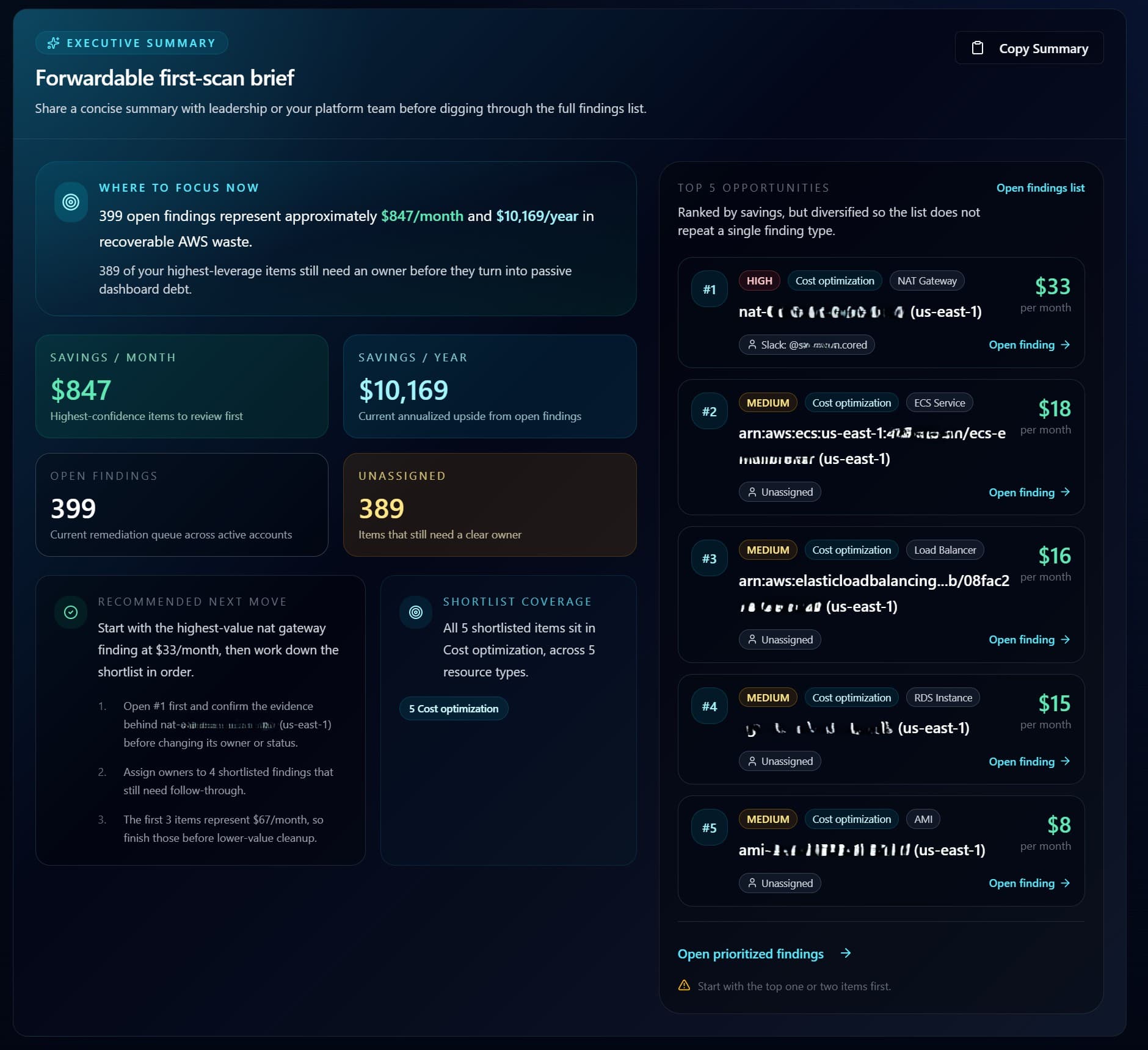
The first-scan brief leads with the Top 3 actions ranked by overdue state, ownership gaps, and monthly upside.
Can my team own it?
The deeper screens keep ownership, overdue status, and remediation guidance visible so the output feels operational, not theoretical.
Trust first
See the tiered setup before you connect
Buyers should not have to guess whether access is safe. This screen makes the Core Scan Role, optional add-ons, and first-scan path concrete before anyone connects AWS.
Customer account name, account ID, external ID, role ARN, and copied trust-policy identifiers are redacted.
The short setup path makes implementation effort look manageable from the start.
Keeping the region visible adds context without exposing customer identity.
Money and proof
Start high-level, then drill into exact evidence
One view should answer the value question quickly. The next should let technical teams verify where the savings came from and why the recommendation is credible. OpsCurb does both.
The executive brief leads with the Top 3 actions, including why now, monthly savings, and owner status.
The findings workspace keeps overdue and unassigned waste visible instead of hiding it behind totals.
Deep inspect shows the evidence behind each recommendation before anyone changes production.
Action, not theatre
Guided remediation that still respects production risk
This is where the product earns trust with engineering teams. The guidance is useful and concrete, but it does not pretend destructive automation is always the right move.
The remediation view keeps recommendations optimization-first, so teams can review changes without being pushed into risky automation.
Owner, ticket, and due-date workflows turn each recommendation into assigned follow-through.
Weekly digests and workspace views bring overdue or unowned findings back to the top until they are closed.
After the first scan
Value continues after the first scan
OpsCurb does not stop at initial discovery. It keeps pressure on waste, tracks what has already been recovered, keeps the open monthly and annual upside visible, and surfaces budget risk before the month closes.
Recovered value stays visible
The dashboard is where recovered savings stop being a one-time claim and become something leadership can keep checking.
All-time savings
Shows what has already been recovered, not just what might be possible.
Open upside
Keeps the remaining monthly and annual opportunity in view so momentum does not stall.
Budget pressure stays in view
Forecasting extends the story from cost cleanup into ongoing spend control and budget awareness.
The dashboard keeps all-time savings, resolved findings, and current monthly upside visible in one place.
Forecasting extends visibility from cost cleanup into ongoing spend control and budget awareness.
Together these screens show what has already been recovered and what still needs ownership.
See the post-signup product path before you connect
This walkthrough shows the product journey end to end: safe onboarding, concrete savings, credible evidence, and a path to recurring savings that leadership can track.
Leadership
A brief you can forward internally without translating raw infrastructure detail.
Engineering
Evidence and risk-aware guidance before changing anything in production.
Finance
Tracked savings and budget visibility, not just a one-time waste report.